New Born inside WIINK — now for every team that ships client work

Client projects that never stall between handoffs.

Flowral maps every project as a flow of dependent tasks. Finish one and the next goes live — so your team always sees exactly what's ready to work on, and nothing falls through the cracks between people.

✦ No credit card · Free forever for two people · Built for agencies & service teams
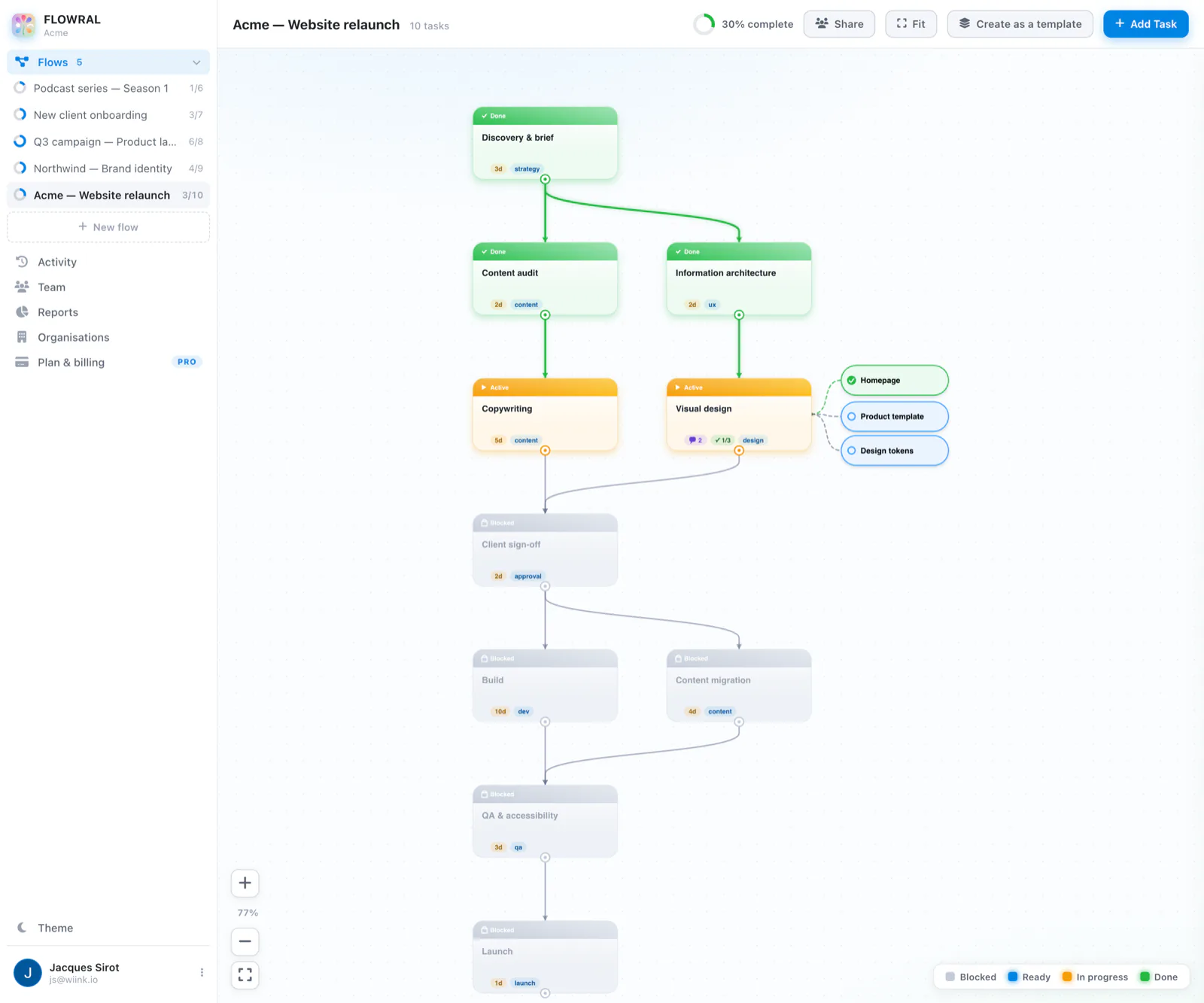
Acme — Website relaunch · live project flow
A client project in Flowral: finished tasks in green at the top, work in progress in amber, and blocked tasks in grey below, joined by dependency lines.
Used every day by WIINK's own delivery teams · Built for creative agencies · dev & product studios · and consultancies
Why it's different

The plan is the dependencies — so nothing starts before it's ready

Most tools give you a flat list of tasks and hope the team figures out the order. Flowral makes the order the whole point.

🔗

Dependency flows

Map each project as a flow. Tasks connect by dependency, so the plan already is the timeline — no separate Gantt chart to babysit.

🟢

Only what's ready

Finish a task and its dependents go live. Set “requires X of N” gates so work waits until approvals and sign-offs are actually in.

🎯

Radical focus

The team sees only unblocked work — the few things that matter right now, not a wall of backlog nobody can prioritise.

👥

Team & client workspace

Bring your team — and your clients — into one shared space. Assignees, roles and comments on every task.

📋

Automatic activity feed

Every handoff and completion logged as it happens. Status updates and standups basically write themselves.

📊

Progress you can see

Live progress on every project and a workload view across the team. Know what's on track before the client asks.

Who it's for

Built for teams that deliver through handoffs

If a project has steps that depend on each other — and people waiting on each other — Flowral keeps it moving.

Campaigns and creative, delivered on time

Brief → concept → design → client approval → launch. Map it once and the team always knows what's blocked, what's next, and what's live — across every client account.

  • Copy → design → approval → schedule, gated in order
  • Assets can't go live until client & brand both sign off
  • Run every client account as its own flow, side by side
  • The activity feed becomes your status update — automatically
Campaign briefstrategy · doneTM
Concept + designcreative · doneAL
Client approvalready · in reviewClient
🔒Go live everywhereblocked · needs approval

Ship builds without the chaos

Break a build into a flow of dependent tasks. “Build” can't start until design and the API are both done — dependencies are enforced, not just buried in a ticket nobody reads.

  • Model builds as flows with real prerequisites
  • “Requires 2 of 3” gates for review, QA & client sign-off
  • Sub-tasks per node for the fiddly implementation detail
  • Activity feed doubles as a client-ready changelog
Design API contractbackend · doneJD
Auth servicebackend · doneJD
Build checkout flowready · in progressMR
🔒Ship to prodblocked · needs QA + review

Deliverables that never slip through the cracks

Engagements have phases, dependencies and client touchpoints. Map the whole delivery as a flow so every consultant knows what's ready — and every client can see progress without a status call.

  • Phase-gate delivery: discovery → build → review → handover
  • Client-facing progress without a status meeting
  • Reusable flow templates for engagements you repeat
  • See workload across every active client at a glance
Discovery workshopphase 1 · doneSP
Draft deliverablephase 2 · doneSP
Client reviewready · with clientClient
🔒Final handoverblocked · needs sign-off
How it works

From blank canvas to delivered in three moves

Map the flow

Drop tasks on the canvas and drag connections between them. The dependencies you draw become the plan.

Bring in your team

Invite the team and your clients, assign tasks, and set gates. Everyone sees exactly what's actionable right now.

Complete & unblock

Finish a task, the next goes live. The flow fills in and the activity feed records the whole delivery.

Inside a task

Break it down, and it opens itself

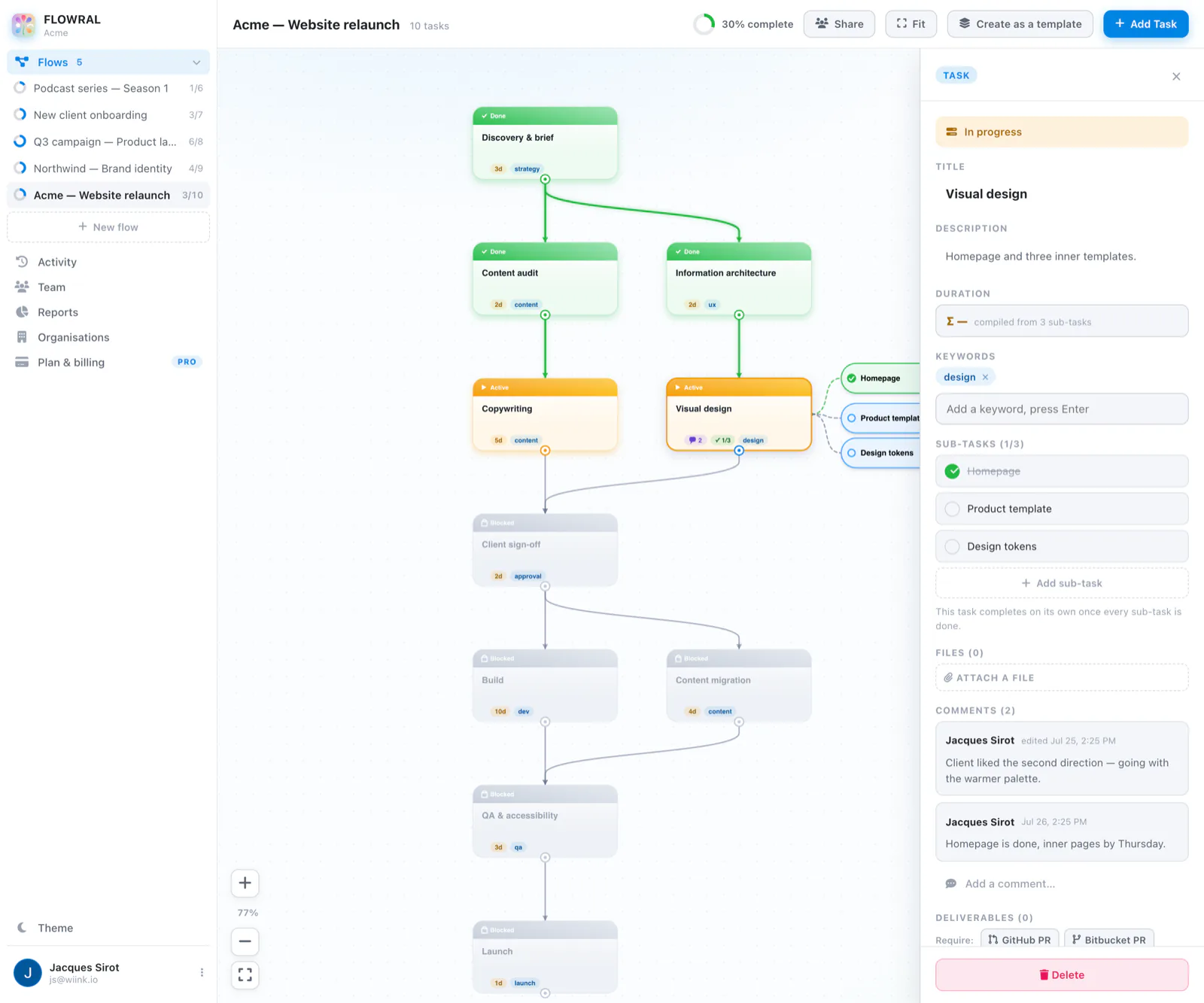
Give a task its sub-tasks and Flowral tracks them for you. The task finishes when they're all ticked — no separate checklist to keep in sync, no status to update by hand.
  • Sub-tasks sit beside the task they belong to
  • Estimates roll up from the parts you've listed
  • Comments and files live on the task, not in a chat thread
  • “Requires X of N” gates hold work back until sign-off is in
Acme — Website relaunch · task detail
A task open in Flowral showing its status, description, sub-task checklist, estimate and comment thread.
And the rest of it

Status that writes itself

Because the flow already knows what's done and what's waiting, the answers to “where are we?” come for free.
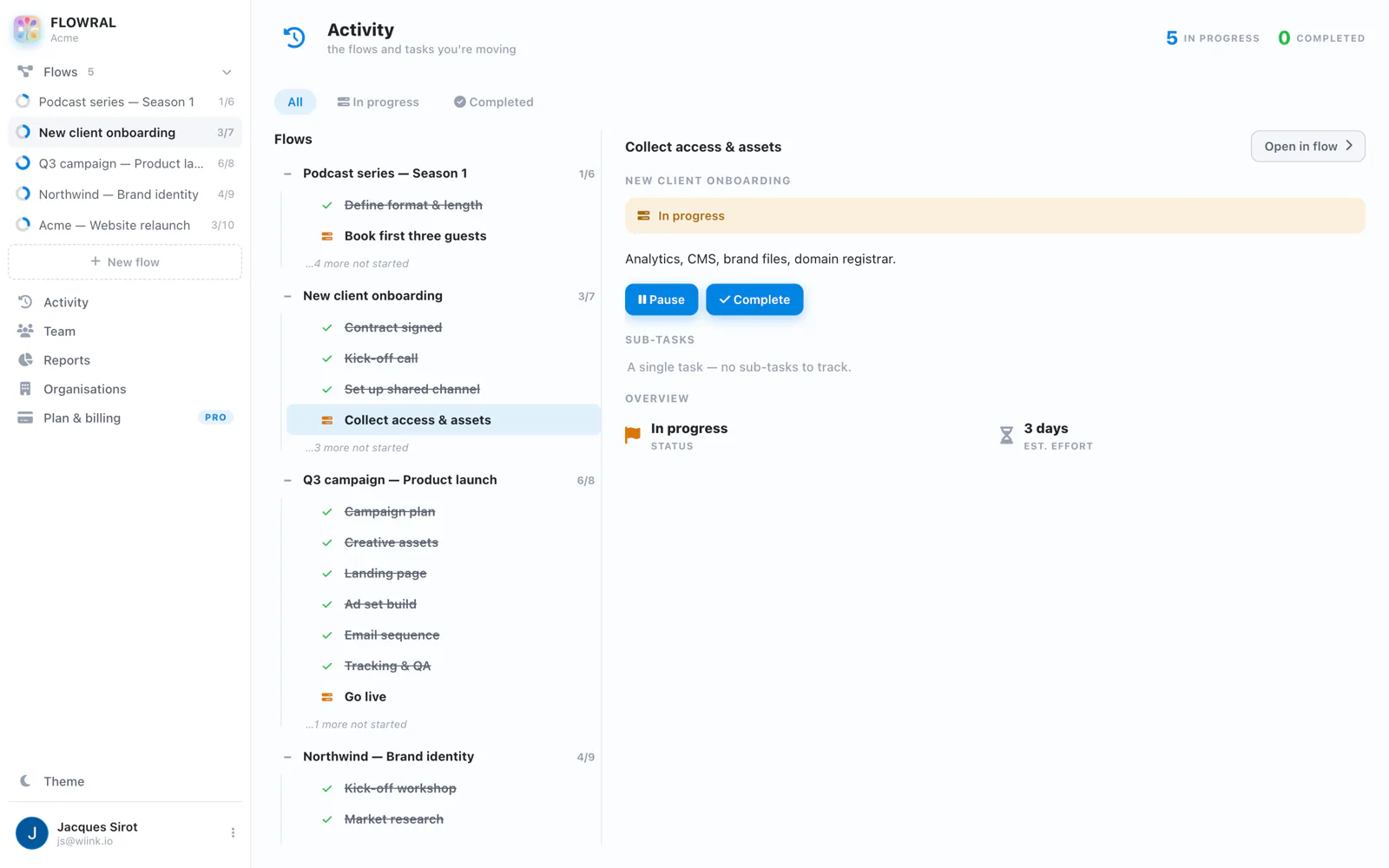
Acme · activity feed
Flowral's activity feed, grouped by flow, with a task's detail open beside it.

Activity feed

Every completion, comment and handoff, logged as it happens. Catch up in a minute instead of a meeting.
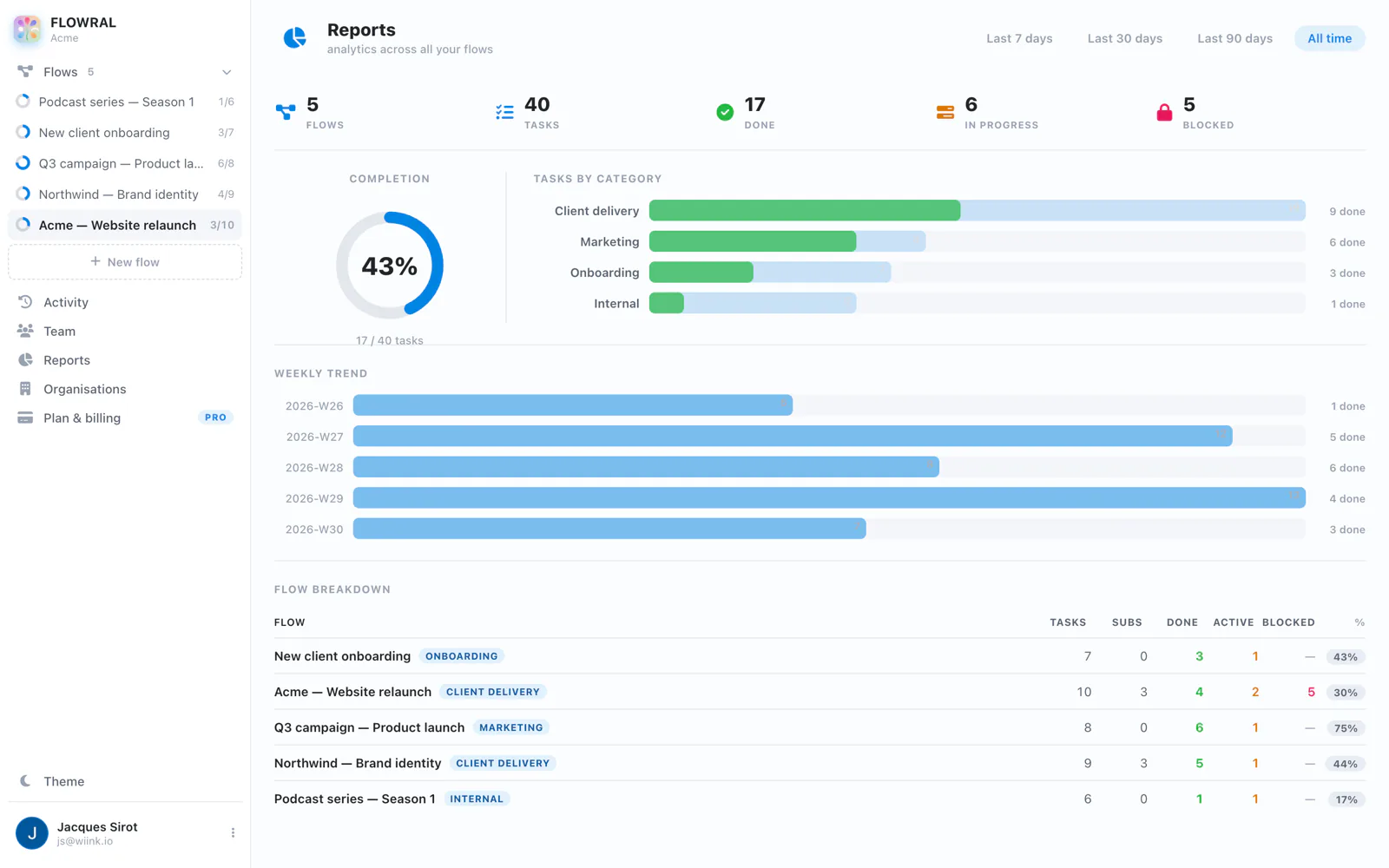
Acme · delivery reports
Flowral's delivery reports: completion percentage, tasks by category, weekly trend and a per-flow breakdown.

Delivery reports

Completion, throughput and where work is stalling — across every client project at once.

faster to spot a stalled handoff
0
status meetings needed
100%
of progress, visible live
projects — on every plan, free included
Simple pricing

Free for two. €9 a person after that.

No trial to expire and no seat minimums. Clients and guests are free on every plan — you're only ever billed for people on your team.

Free
For pairs, and for trying it properly
€0
forever · up to 2 people
Get started
  • Unlimited flows, workspaces & attachments
  • Unlimited free guests & clients
  • The full canvas, gates and Ready view

Free limits three things — people, saving templates and reports. → See the full breakdown

Your next client project doesn't have to be chaos.

Give your team — and your clients — one clear view of what's ready, what's blocked, and what's next.

Start free — no card needed