Flowral Project management software for agencies & service teams

Flowral keeps client projects moving between handoffs.

Plan client projects in the order they need to happen. When one task is finished, Flowral makes the next one available.

✦ No credit card · Free forever for two people · Built for agencies & service teams

Acme: Website relaunch · live project flow
A client project in Flowral: finished tasks in green at the top, work in progress in amber, and blocked tasks in grey below, joined by dependency lines.
Flowral is used every day by our own delivery teams · Built for creative agencies · dev & product studios · and consultancies
About Flowral

A clear plan for work that happens in stages

Create a flow for each project, connect the tasks that depend on one another, and invite the people involved. Your team sees what can be started now, while clients can follow progress and approve their part of the work.

Flowral runs in your browser and is built for agencies, studios and consultancies. It is free for two team members, and clients and guests are always free.

Why it's different

Everyone knows what can start next

Connect the steps once. Flowral keeps the order clear as the project moves forward.

🔗

Dependency flows

Connect tasks in the order they need to happen and see the whole project on one canvas.

🟢

Only what's ready

Finished work opens the next task. Approval gates keep later work on hold until it is ready.

🎯

A focused task list

Each person sees the work they can start now, without blocked tasks getting in the way.

👥

Team & client workspace

Assign work, discuss tasks and give clients a clear view of the projects you share with them.

📋

Automatic activity feed

Completions, comments and handoffs are recorded as they happen.

📊

Progress you can see

See project progress and workload across your team in one place.

📅

Timeline & Gantt Pro

View the same project against a calendar without maintaining a separate plan.

REST API Pro

Build your own integrations: webhooks, a versioned API, workspace credentials. Learn more →

💬

AI & MCP Pro

Connect Flowral to Claude, ChatGPT and the tools your team already uses. Learn more →

Who it's for

Built for teams that deliver through handoffs

For client work that moves through briefs, reviews, approvals and handoffs.

Campaigns and creative, delivered on time

Brief → concept → design → client approval → launch. Map it once and the team always knows what's blocked, what's next, and what's live, across every client account.

  • Copy → design → approval → schedule, gated in order
  • Assets can't go live until client & brand both sign off
  • Run every client account as its own flow, side by side
  • The activity feed becomes your status update, automatically

Flowral for creative & marketing agencies →

Campaign briefstrategy · doneTM
Concept + designcreative · doneAL
Client approvalready · in reviewClient
🔒Go live everywhereblocked · needs approval

Ship builds without the chaos

Plan the work around design, development, review, testing and client approval.

  • Model builds as flows with real prerequisites
  • “Requires 2 of 3” gates for review, QA & client sign-off
  • Sub-tasks per node for the fiddly implementation detail
  • Activity feed doubles as a client-ready changelog

Flowral for dev & product studios →

Design API contractbackend · doneJD
Auth servicebackend · doneJD
Build checkout flowready · in progressMR
🔒Ship to prodblocked · needs QA + review

Deliverables that never slip through the cracks

Map each engagement from discovery to handover, including the steps that need client input.

  • Phase-gate delivery: discovery → build → review → handover
  • Client-facing progress without a status meeting
  • Reusable flow templates for engagements you repeat
  • See workload across every active client at a glance

Flowral for consultancies & services →

Discovery workshopphase 1 · doneSP
Draft deliverablephase 2 · doneSP
Client reviewready · with clientClient
🔒Final handoverblocked · needs sign-off

Give an agent targets, not a prompt

Connect Flowral through MCP and an agent sees only what's actually unblocked, so nobody has to re-explain what's next every session.

  • "What's ready" is computed, not re-prompted, every run
  • Completing one target unlocks the next automatically
  • Acts as the person who connected it, under their role
  • Works alongside human work in the same flow

Flowral for AI agents →

Design double-click interactionUI · doneJS
Implement double-click handlerdoneAI
Handle multi-select edge caseready · in progressAI
🔒Add keyboard fallbackblocked · needs edge case

Design doc to ship, with art and code in parallel

Map a feature once: prototype, art and programming run side by side, then QA and platform cert before it ships.

  • Art and programming both unlock the moment they're both cleared to start
  • Whatever needs both waits until the slower track actually finishes
  • Cert is sub-tasked per platform: ship gates on all of them, not most
  • The critical path is computed, so you know what's really holding the date

Flowral for game studios →

Design doc & feel targetdone
Playtest & greenlightdone
Animation setin progress
Gameplay programmingin progress · critical path
🔒QA passblocked · needs VFX + level integration
How it works

Set up a project in three steps

Map the flow

Add the tasks and connect them in the order they need to happen.

Bring in your team

Invite your team and clients, then assign the work.

Complete & unblock

Complete each task and Flowral opens the next one.

Inside a task

Keep the details with the task

Add a checklist, estimate, files and comments. Everything stays with the work it belongs to.
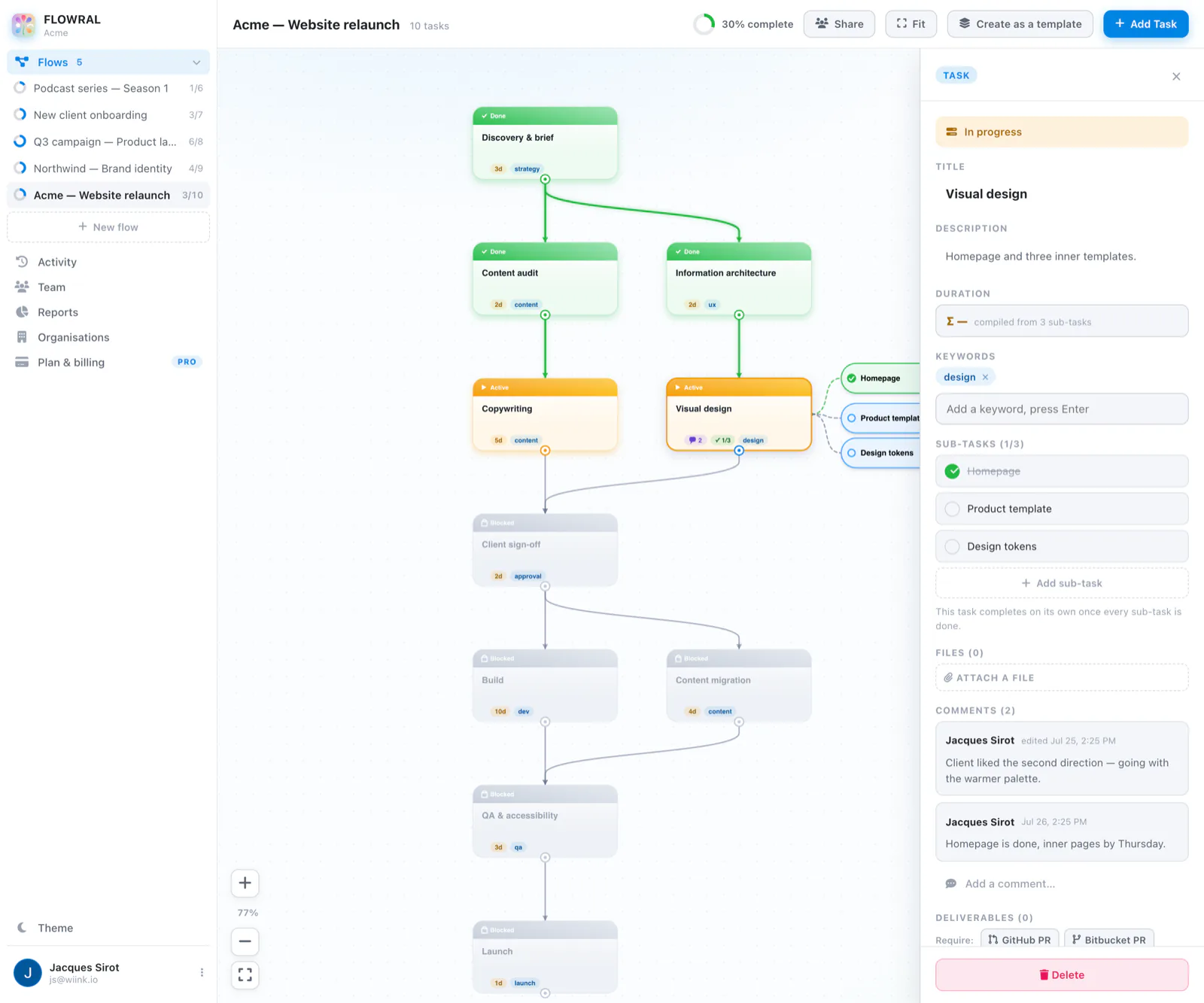
  • Sub-tasks sit beside the task they belong to
  • Estimates roll up from the parts you've listed
  • Comments and files live on the task, not in a chat thread
  • “Requires X of N” gates hold work back until sign-off is in
Acme: Website relaunch · task detail
A task open in Flowral showing its status, description, sub-task checklist, estimate and comment thread.
Project updates

See progress without chasing for updates

Acme · activity feed
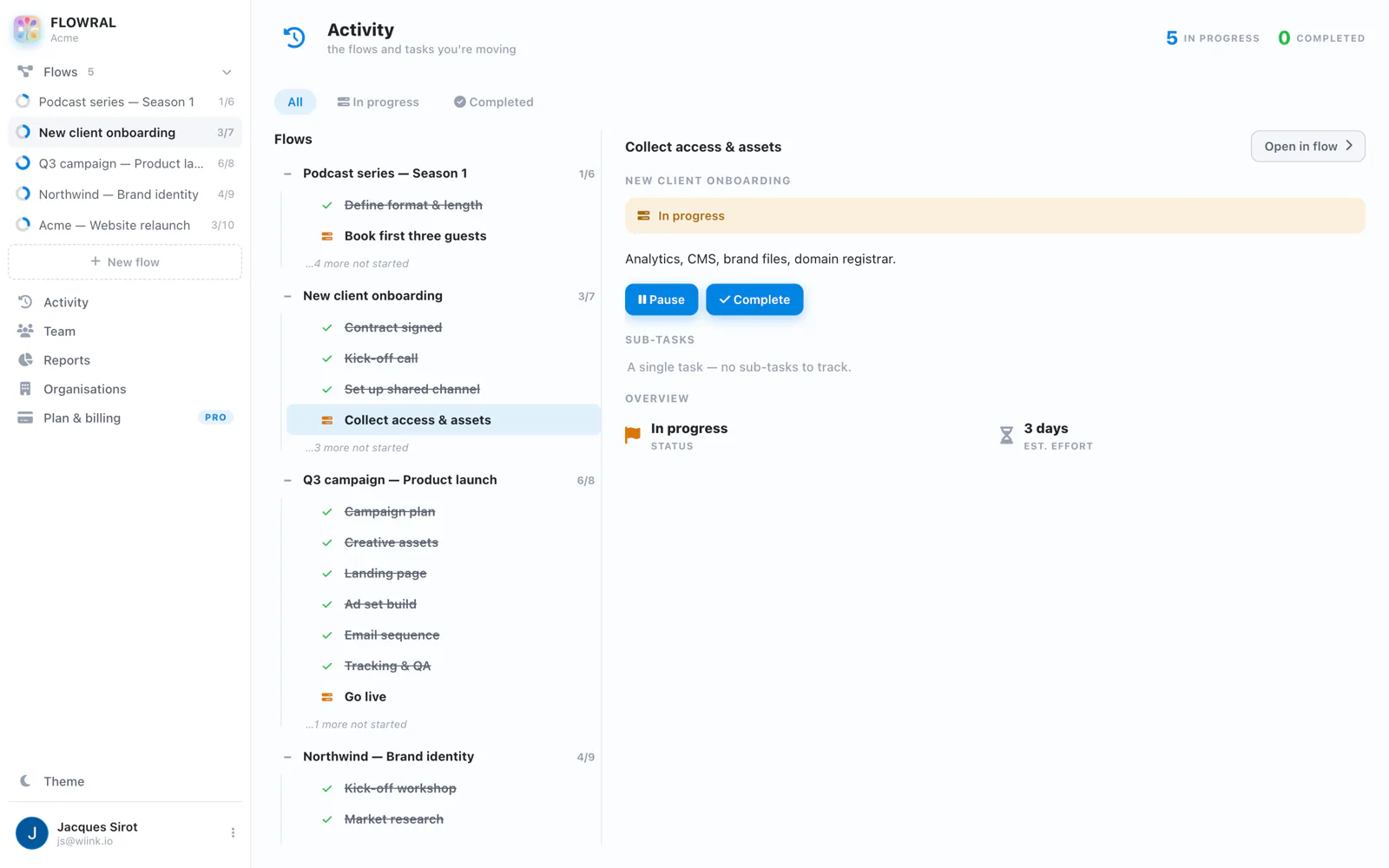
Flowral's activity feed, grouped by flow, with a task's detail open beside it.

Activity feed

See recent completions, comments and handoffs in one feed.
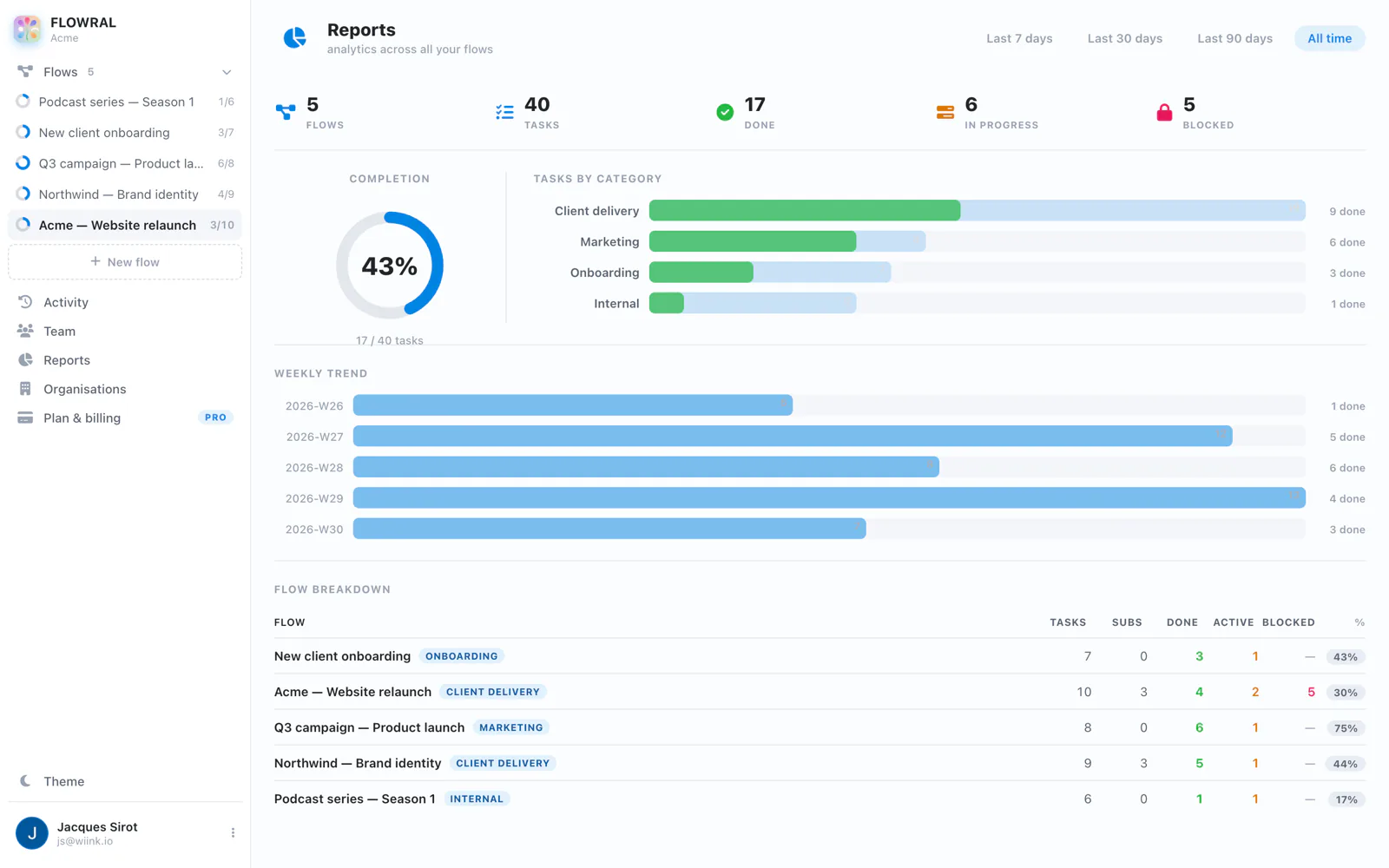
Acme · delivery reports
Flowral's delivery reports: completion, work left, what's blocking delivery and a per-flow breakdown.

Delivery reports

See progress, work remaining and anything holding up delivery.

Q3 offsite · brainstorm
Also in Flowral

Not every idea is ready to be a flow

Brainstorms are an open, branching canvas for the ideas that come before a plan: workshops, retros, a client kickoff. Its own space in Flowral, not a waiting room for a flow.

See how Brainstorms work →

Simple pricing

Free for two. €9 a person after that.

No trial to expire and no seat minimums. Clients and guests are free on every plan, so you're only ever billed for people on your team.

Free
For teams of up to two
€0
forever · up to 2 people
Get started
  • Unlimited flows, workspaces & attachments
  • Unlimited free guests & clients
  • The full canvas, gates and Ready view

Compare the plans →

Your next client project doesn't have to be chaos.

Give your team, and your clients, one clear view of what's ready, what's blocked, and what's next.

Start free, no card needed